toctree
原本的reST檔案,本身無法連結到其它檔案。故Sphinx提供此種方法,來互相連結檔案。
使用toctree,可以連結其它reST檔案,並形成連結清單。
基本語法:
.. toctree::
    :<property setting>:

    <reST file>
    .....
Property setting
- maxdepth
- 設定toctree能夠顯示的最大層數。
- titlesonly
- 只有顯現出每層的標題
- hidden
- 隱藏所有連結。
- numbered
- 會幫你把所有toctree的標題前都加上編號,必須把doctree內的資料都砍掉才能復原。
- glob
- 在make時,toctree只會在此檔案所在的目錄去掃描對映的檔案。使用glob關鍵字,可以掃描指定資料夾內的rst案,並使用萬用字元。
Example
我們由此文件的總目錄來當範例:
.. toctree::
    :maxdepth: 2

    introduction
    installation
    quick-start
    reST/index
    directive/index
demo:
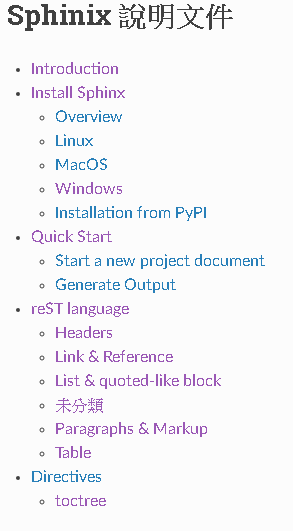
maxdepth = 3
.. toctree::
    :maxdepth: 3

    introduction
    installation
    quick-start
    reST/index
    directive/index
demo:

可以看到當maxdepth = 3時,清單連結會根據rst檔案內的章節、標題、子標題…等來建立連結清單。
maxdepth = 3, titlesonly
.. toctree::
    :maxdepth: 3
    :titlesonly:

    introduction
    installation
    quick-start
    reST/index
    directive/index
demo:
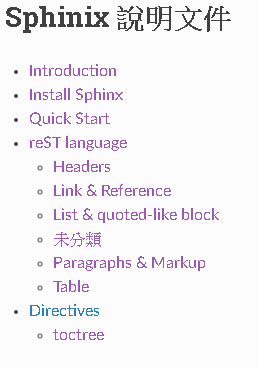
可以看到設定了titlesonly後,清單連結只會使用rst檔案的最上面的標題。
本身的說明文件reST/index.rst使用了 glob 關鍵字:
.. toctree::
    :maxdepth: 1
    :glob:

    *
此關鍵字會直接納入reST目錄底下的檔案(所有都是*.rst)。